Play your songs on in-game instruments

A lightweight Android app that performs your songs on a game's on-screen instrument — from a small floating controller. Choose your song, match the keys and press Play.

Android No ads Free local playback Account optional Floating controls
Music Tree Player · Android
Music Tree Player 1.5.7. A clearer song library, illustrated tutorial, 24 app languages and optional Pro tools, with improved account handling and purchase recovery. Explore community audio previews, Pro sharing and private backup.
1.5.7 features

A fresh look at your music

Explore the app in our illustrated feature cards. Tap a card to see the full-size screen and description.
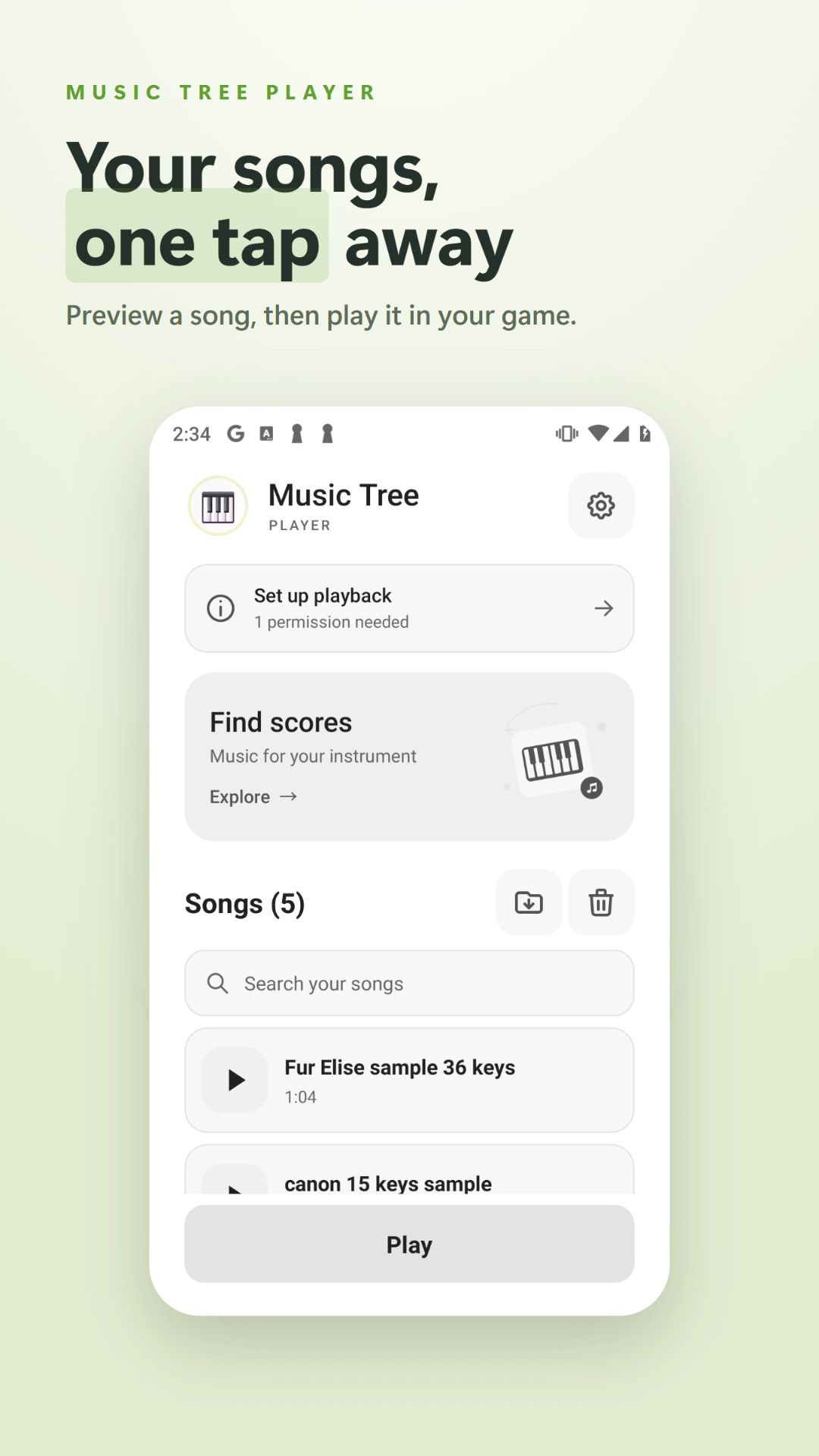
Music Tree Player song library with a preview button beside each song
Your songs, one tap awayFind a song, hear a piano or drum preview, then open the floating player.
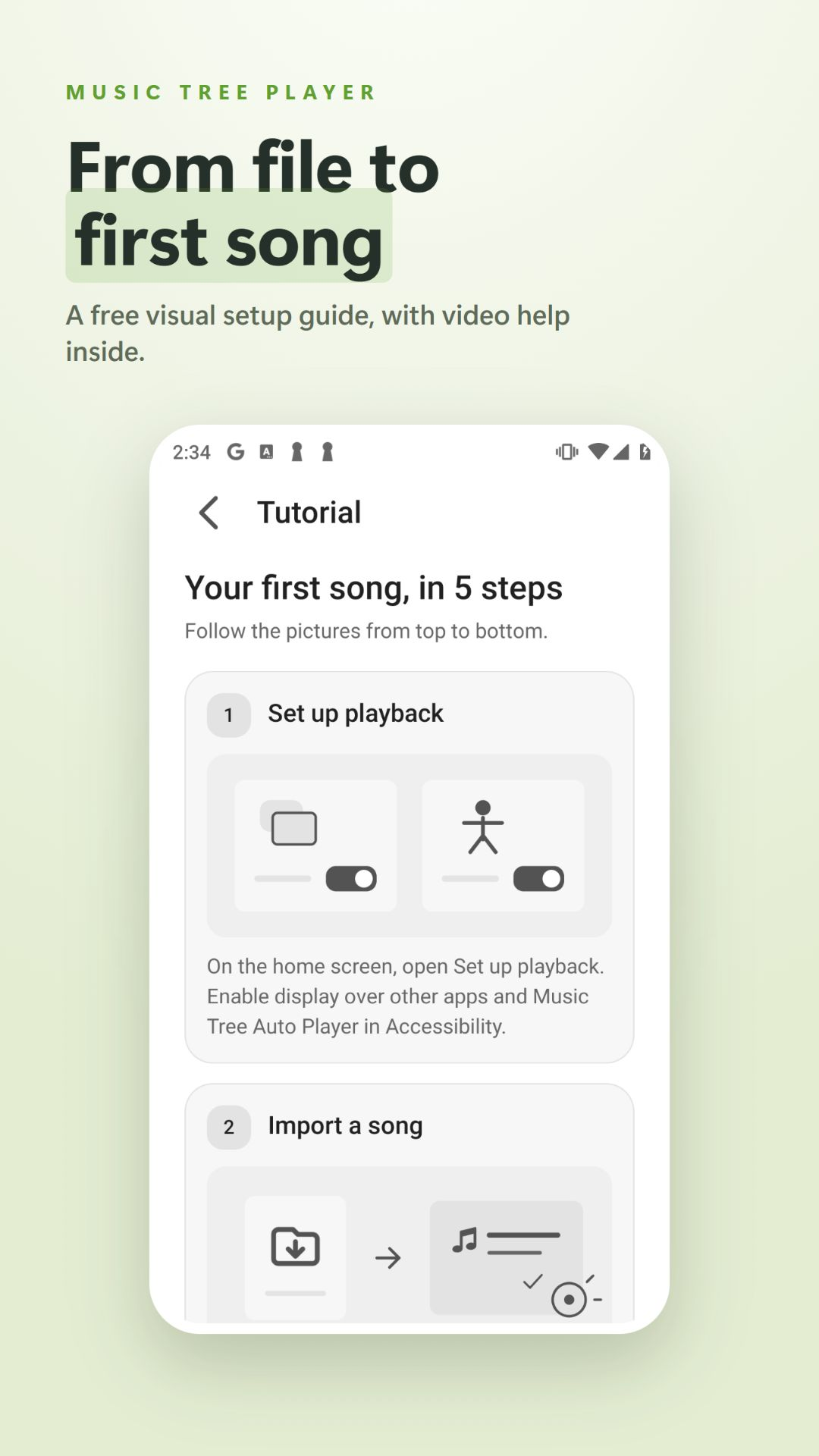
Illustrated Music Tree tutorial with permission and song import steps
See each stepA simple illustrated guide inside the app, with the video link at the bottom. Always free.
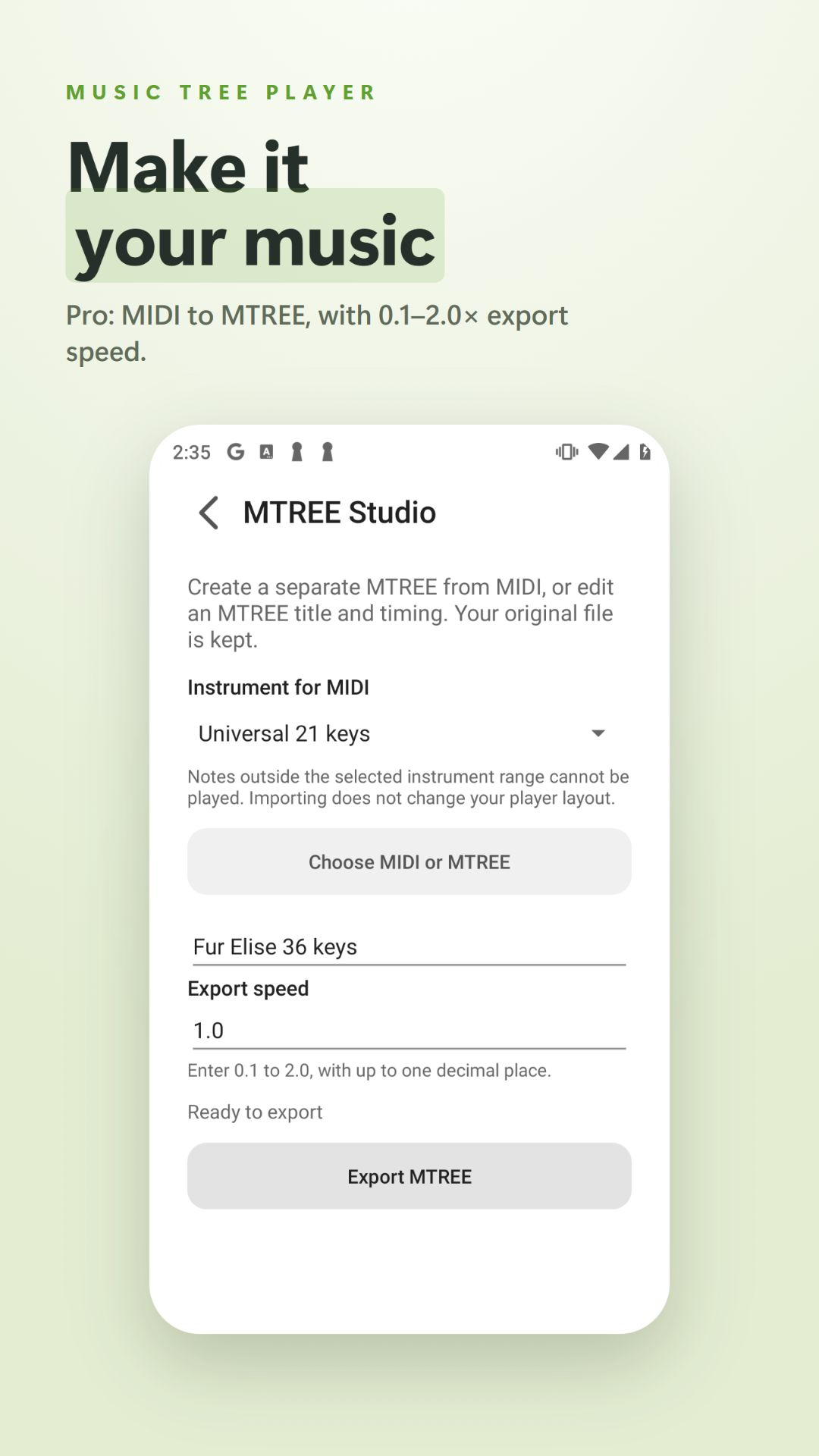
MTREE Studio instrument selection and export speed controls
Create with MTREE StudioPro: make MTREE files from MIDI, edit a title and export at 0.1–2.0 speed.
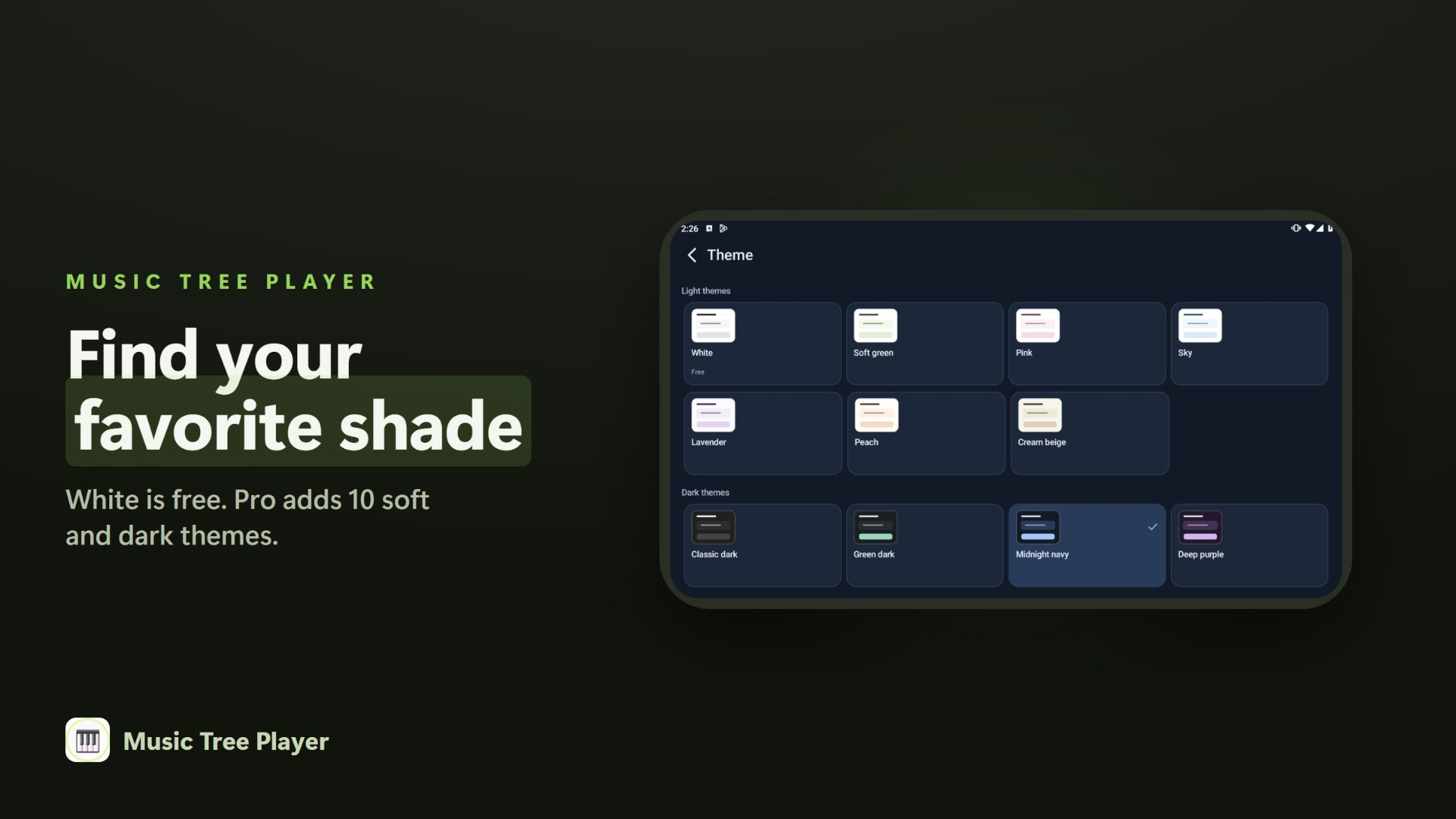
All eleven Music Tree themes, including White, pastel colors, Cream beige and four dark palettes
A palette that feels comfortableWhite is free. Pro adds ten palettes, including Soft green, Pink, Sky, Cream beige and four dark themes.

Screenshots and videos show the original app interface. The written guides on this website are available in all 24 languages.

Free playback

Keep playing your own files

  • Import and play external MTREE, MIDI and music-only MCR files.
  • Browse community scores and hear up to 30 seconds of audio for free.
  • Playback, layout fitting, speed, key controls and the illustrated tutorial remain free.
  • Notes outside the selected instrument range, including unsupported semitones, are skipped.

MTPC is a PC format and cannot be played on Android. PC downloads and MTPC export are temporarily unavailable during maintenance. Unsupported notes are always skipped.

Optional Pro · One-time purchase

One purchase, more ways to use your library

  • Ten extra themes and a choice of 24 app languages, including a device-language option. Free mode stays in English; instrument names stay in English in every language.
  • MTREE Studio creation, editing and export from MIDI or compatible MTREE. Choose an export speed from 0.1 to 2.0 in steps of 0.1.
  • Private song-file backup through your app Google account: up to 100 files / 50 MiB, with 1 MiB per file. Restore MTREE to Songs or save the original files.
  • Upload and download community scores, and play downloaded community scores.
  • Experimental Key Hold in Settings: 80–1200 ms, off by default. Turn it off for standard playback if a game or device responds inconsistently.
  • Experimental Ensemble in Settings: schedule a shared start from the floating player using server time. Timing may vary.
  • Three bonus arrangements by dad_piano: Für Elise (36 keys), Moonlight Sonata, movement 1 (36 keys), and Canon in D (21 natural keys).

Base price: US$3, once. Google Play shows your local price before purchase. On a new device, use the same Google Play and app accounts you used for purchase, then choose Restore purchases. Your private backup belongs to your app Google account. Canon also works on chromatic instruments that cover its notes.

Community in 1.5.7

Listen before you download. Browsing and audio previews are free; uploading, downloading and playing community downloads require Pro. Your unique nickname appears beside the songs you share. Choose it once using 2–8 English letters or digits. Uploads are limited to 5 new scores per rolling 24 hours and 1 MiB per file. Only normalized musical notes are published after automatic file checks and your rights confirmation.

Signed-in users can report up to 3 scores per rolling 24 hours or block a creator. Four different verified Pro reports temporarily hide a score for administrator review. Confirmed unsafe or abusive uploads can lead to loss of upload rights. Technical checks are not antivirus certification or a copyright clearance. Read the sharing terms.

Ensemble and guitar layouts in 1.6.3

Pro adds experimental Ensemble. Enable it below Key Hold in Settings, then use the clock in place of Loop to enter a shared start time in the floating player. Current server time is always shown. Timing may vary by device and game.

Play with Roblox Guitar 78 keys for acoustic or electric guitar, Roblox Bass Guitar 52 keys, and NTE Guitar 36 keys.

What it does

Turn songs you already have into live performances on a game's virtual instrument.

Import & play

Load a MIDI, .mtree or .mcr file and play it on a virtual instrument.

Layouts that fit

21-key and 36-key chromatic layouts, plus game-specific layouts (incl. Roblox Drum).

Adjust to your screen

Shift the layout left/right and fine-tune touch points per device.

Floating controller

Play, pause, loop, change speed and base key from a small overlay over your game.

Cross-compatible

One sheet works across many instruments — including percussion (drums).

Clean & lightweight

No ads. Local playback works without an account. Optional online features in 1.5.7 use Google sign-in and verified purchases; see our Privacy Policy.

Supported files —.mtree  ·  .midi / .mid  ·  .mcr

Watch & learn

Two short videos to get you playing.

Using a PC? Watch the PC version tutorial.

What's new

What's new in Music Tree Player.

v1.6.6

Key Hold

  • Key Hold switches apply immediately, and duration changes save automatically after editing. Manual saving is still available.
  • Clearer Pro status and Ensemble guidance in all 24 app languages.
  • Fixed song lists being cut off at the sides on some screens.
  • Improved recovery when the game screen is not recognized before playback.
v1.6.3

Floating score browsing and clearer menus

  • Find and add community scores from the floating Songs window without leaving your game.
  • Cleaner search icon and consistent text size in scrolling selection menus.
  • Experimental Ensemble (Pro): schedule a shared start using server time from the floating player.
  • One Roblox Guitar 78 keys layout for acoustic and electric, with a separate Bass Guitar 52 keys layout.
v1.5.19

Larger song lists and new guitars

  • More room for songs, with compact text and wider lists in landscape.
  • Find and add community scores directly from the floating player's Songs list.
  • Added Roblox electric, acoustic and bass guitar layouts, plus NTE Guitar.
  • Open key calibration by selecting an instrument, without a separate Fit button.
v1.5.18

Optimization and stability improvements

  • Optimized playback performance and stability.
  • Improved experimental Key Hold, seeking and resuming, with clearer guidance in all 24 languages.
  • Cleaner dialogs and song selection, repaired icons, and improved spacing and keyboard handling.
  • More readable backup filenames and subtle transparency for the floating player in dark themes.
  • Standard playback timing and purchases remain unchanged.
v1.5.12

Cleaner sharing, remembered settings

  • A redesigned Share a score form matches the Songs panels, with clear fields and fixed Cancel / Publish buttons.
  • The floating controller reopens where you left it.
  • Rename songs directly in Songs. Original files stay unchanged.
  • Base key settings, such as C3, are saved separately for each song.
  • MTPC export is removed during PC maintenance.

Includes the v1.5.11 improvements. The existing playback engine is unchanged.

v1.5.10

Easier browsing and upload management

  • Find scores opens with All instruments. Share a song from Songs or choose an MTREE file.
  • Compact, searchable lists and multiple-score deletion in My uploads.
  • Studio uploads omit unsupported notes and exact simultaneous duplicates, with a notice showing the counts. Original files are kept.
  • Safety messages reviewed in all 24 app languages, with clearer upload forms in dark themes.

Removing an upload does not delete copies already downloaded to a device.

v1.5.7

A clearer app, with improved account and purchase recovery

  • Refreshed song library with piano and drum previews, an illustrated tutorial, community audio previews and uploader nicknames.
  • Optional Pro: 24 app languages, ten extra themes, MTREE Studio export, private backup, community uploads/downloads and three bonus arrangements.
  • Existing purchases are checked again when you return to the app, helping recover access after an interrupted purchase confirmation.
  • Improved account switching and handling of temporary connection errors during sign-in and purchase verification.
  • Delete your account directly from the account icon after checking the confirmation box. The same Google account can rejoin after 7 days.
  • Standard playback keeps its existing timing. Experimental Pro Key Hold is separate, off by default, and available only in Settings (80–1200 ms); it may be unstable on some games or devices.

Local playback remains free. See the existing song EXE tutorial below.

v1.4.4

Version 1.4.4

  • Fixed "Open the target app before playing" appearing while the game was already in front.
  • After a notification panel interrupts a song, pressing Play in the game resumes it directly — no need to leave and re-enter the game.
  • Playback checks the target app before starting and pauses on the home screen, a file picker or the Music Tree screen.
  • Clearer messages: each cause (accessibility off, an open panel, target app unknown) now says what to do.
  • Includes the Android 16 compatibility update (targets API level 36).
v1.4.2

Version 1.4.2

  • Repeat now plays through the whole playlist and loops back to the first song.
  • Playback keeps going over the volume bar and non-covering notifications, then resumes from the same position after an interruption.
  • New MCR File Guide page in Settings explaining song file labels (HTP, NTE, SKY, ...).
  • Playback pauses automatically when the screen turns off or locks.
  • Safer rapid-chord and speed-change handoffs reduce rare Android input-system failures without changing song tempo.
  • Overlay controls are coordinated with automatic note output to avoid touch collisions.
  • Improved dense-passage and large-file handling, including fixes for stalls, missed notes, and duplicate notes.
v1.3.7

Version 1.3.7

  • Added 3 new sample songs (free download on SociaBuzz & Ko-fi).
  • Improved playback stability & smoother chords.
  • Key Layout Fit now aligns precisely on all screens, including cutout / gesture-bar devices.
  • Leaner touch output for drum kits.
  • Fixed Fit editor buttons overlapping the top drag handle.
  • UI/UX optimization — enhanced overall readability.
  • Internal cleanup and stability improvements.
  • New Genshin drum layout.

How it works

1Import your songAdd a .mtree, .midi/.mid or .mcr file to your library.
2Match the keysPick a layout and line it up with your game's on-screen instrument.
3Press PlayOpen the floating controller over your game and perform — pause, loop or change speed anytime.

Get Music Tree Player

Download Music Tree Player for Android.

💾 Sample .mtree files — grab 4 songs on SociaBuzz & Ko-fi and import them in the app:

Due to iOS macro-app restrictions, this release is Android-only.
Installation

Install from Google Play

  1. Open the Google Play listing.
  2. Tap Install, then open the app.
  3. Grant the permissions on the right when prompted.

Want songs to start with? Download the .mtree samples above and import them in the app.

Permissions

Required permissions

  • Overlay — for the floating controller.
  • Accessibility — to tap the instrument keys for the song you choose.

How to use

The controller

  1. Press Play to launch the controller.
  2. Enter the game and add a song from the top-left of the controller.
  3. Switch between three states:
    Minimized — long-press to pause / resume · Normal · Maximized — full controls.

Maximized panels. Left: previous · loop · next · playback speed. Right: base-key adjustment · key-layout settings.

Key-layout tips

  • Select the keyboard that matches your in-game instrument.
  • Touch points vary by device — adjust the layout slightly if playback sounds off.
  • Shift the layout left/right depending on the game.
  • A song can work across compatible layouts. Notes outside an instrument's range or unsupported semitones are skipped; they are not forced onto another key.
Known limitation: the UD & OH piano currently has unstable octave-switching, so it is temporarily fixed to the middle octave. This will be improved in a future update.
Windows

Play on PC

1. Song EXE macros

Start with the existing tutorial to learn how to export and play a song as an EXE macro.

2. Music Tree Player PC

Under maintenance

The PC player is under maintenance. Downloads are temporarily unavailable.

Permissions & privacy. Music Tree Player uses an overlay (to show controls over your game), an accessibility service (to tap the instrument keys for the song you choose), and a foreground service with a notification (to keep the player running while you are in the game). Local songs stay on your device unless you choose to back them up. Optional online features in 1.5.7 use Google sign-in, purchase verification, private backup and optional public sharing. No ads. Read the full Privacy Policy.